-
What is Linktrack?
Linktrack is a free service designed to shorten very long urls (links) to make them easier to read, remember, and send to other people.
Every link you create lets you track when it’s been clicked on, and who clicked it!
-
Who is it for?
Linktrack is built for anyone who wants a simple and effective way to track links online.
-
How can I use a tracking link?
You can use your tracking link to track anytime someone clicks your link. Use it anywhere you would put a web address!
-
- Put your tracking link in an email signature and count the number of people who check out your web site from your emails.
- Send them with your instant messaging client or in an email to shorten long links.
- Use them on advertising sites like Craigslist.org. Know who’s reading your ads, and how effective they are.
- Post them on your own web site and learn which links on your web page attract the most attention.
- Point your pay-per-click marketing sites like Google Adwords or Yahoo!’s YPN network to them so you know what you’re paying for.
- Use them with affiliate programs to disguise affiliate links and track commissions.
- Put them in a forum signature so you can know who’s reading your posts.
- Put them on an auction site like eBay. Track clicks from your ad to hosted images so you know who’s been looking at pictures of your auction.
- The possibilities are limitless! If you figure out a cool use for our service, contact us and let us know. -
How long do you keep data?
We keep line-item data for 30 days and counter data indefinitely.
Line-item data includes detailed information about each click (date, time, referral source, etc.) and is used to make our reports. Counter data shows the total number of clicks your link has received since it was made. -
Will my links expire?
Links created anonymously or using a free account will automatically expire after 7 days or 100 clicks. Links created with any premium account won't expire.
-
I made a bunch of links before I set up an account. Can I transfer them?
We handle this on a case-by-case basis. For the most part the answer is yes, but the process is manual and you'll need to contact us. If possible, please include your computer's IP Address in your request, and be prepared to answer some identifying questions.
-
Can I delete a link in my account?
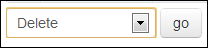
Sure! Just look for the "Delete" option in the dropdown menu at the bottom of the "My Links" page. Remember, deleting a link is permanent and will remove the link and all of its history from your account.
-
Can I reset my link history without deleting the link?
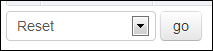
Yes! If you're a premium account holder look for the "Reset" option in the dropdown menu at the bottom of the "My Links" page. This will permanently remove all of the link's tracking history from your account.
-
What kind of redirect do you use?
We use the industry standard 301 or "permanent" redirect as suggested by Google, Yahoo!, and MSN. The permanent redirect tells search engines that the Linktrack link they're following is just a placeholder, and that the real content is located at the target destination. This passes on any search engine relevance to the target link rather than assigning it to our site.
-
Do you offer unique visitor tracking?
Unique visitor tracking is available on our professional accounts.
-
Can I send tracking links in my spam email campaign?
No. Using our tracking links in conjunction with unwanted (spam) mail is strictly prohibited by our terms of service and will not be tolerated.
-
Can I use Linktrack with:
- Twitter? - yes
- Facebook? - yes
- MySpace? - yes
- Social Networking? - yes
- Google Adwords? - yes
- Pay Per Click Campaigns? - yes
- Affiliate Marketing? - yes
- Email Advertising? - yes
- Online Forums? - yes
- Craigslist? - yes
- Personal Emails? - yes
- Images? - yes
- To avoid yard work? - no
-
Is your service built into any Twitter clients?
Not yet, but we're working on it. If you're developing a Twitter client and would like to include Linktrack, please let us know.
-
Can I make custom or vanity URLs?
Absolutely! This feature is standard on all of our premium accounts.
-
Do you share the tracking links that I make?
Premium accounts have the option to make their links completely private. Otherwise, we publish them on our recent links page and other parts of the site.
-
Can your service handle parameter strings?
Here's a Google link that includes some parameters:
http://www.google.com/search?hl=en&q=movie+times&btnG=Search.
Not only can our service handle long urls with parameters, but we also decipher them from the major search engines to record which keywords are being used to find your link. -
Can I turn links on and off?
Yes - this feature is common to all of our premium accounts.
-
When do the daily counters for my links reset?
Daily counters reset every night at midnight CDT.
-
Can I make a tracking link without coming to this web site?
Certainly! Check out our bookmarklet page for details.
-
How can I use the bookmarklet with my account?
We'll automatically assign the links you make with your bookmarklet to your account.
-
Do I have to be logged in to use the bookmarklet?
Definitely not - we'll make a tracking link from your bookmarklet whether you're logged in or not.
-
How can I cancel my billing?
We love having you as a customer, but you can cancel at any time here
-
What is Plus+ Tracking?
Plus+ Tracking is a premium feature that allows you to add additional identifying information to your tracking links so you can use one tracking link to measure response from multiple sources.
With a Plus+ Tracking link, you can add additional text to the end of any of your tracking links. Not only do we record all the tracking data when your link is clicked, but we also record the text you added to the end. This gives you a quick and easy way to distinguish who clicked which link!
Check out our blog for some Plus Tracking examples. -
Why is there a picture of a robot under "bot"?
Bots (sometimes called search spiders), are automated programs that scour the web for information. They follow links just like regular people, so if they follow a tracking link their visit is recorded. If the click comes from a known bot on our bot list (like Google's googlebot, or the Yahoo! Slurp bot) we mark them in your report.
-
Why are the referrers sometimes blank?
A blank referrer field on your tracking page means that the system was unable to collect any referring information from the click. Referrer information is only passed when your visitor clicks a link from another web page, so this will show up as "none" for anyone clicking your link in an email, or typing it directly into the address bar of the browser. Our system records and displays any referrer information that it can collect, but defaults to "none" when there is none available.
Read more about the referral tracking on our blog. -
How do I setup conversion tracking?
Conversion tracking is a feature available to professional accounts.
To get started, turn on the conversion tracking option for your link:
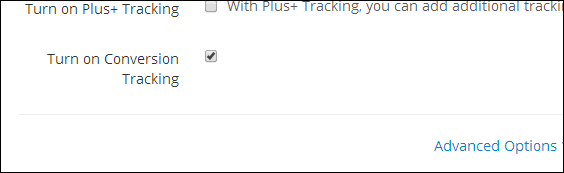
Once enabled, select "Get Conversion Code" from the quicklinks menu:
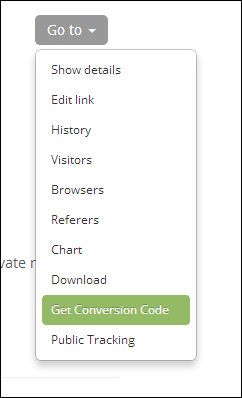
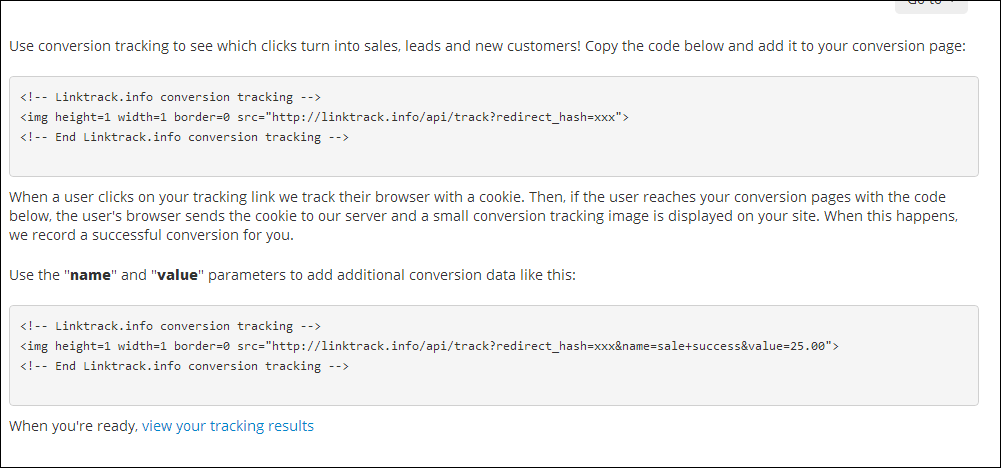
Copy and paste the HTML conversion code onto the success page for your project. This is usually an order or signup completion page: